Showing posts with label Pocket Scrapbooking. Show all posts

Friday, January 2, 2015

New File and FREEBIE Friday!

TGIF, everyone! I hope you all are having a fantastic New Year, so far!!!  I spent a little time this week creating some shapes that would be great to use in traditional and pocket scrapbooking. These files will be ON SALE through the weekend. Here's what's new in the Pretty Paper, Pretty Ribbons Store. 


Before I show you this week's freebie, I want to invite you to join our Christmas Challenge that is going on right now. Just link up your Christmas-themed project that features PPPR files, and you will be entered to win a $20 Gift Certificate to the PPPR store. WOW! You have until January 3 to link up. You can find all of the details about the challenge HERE. 


Finally, there's a new FRIDAY FREEBIE in the store. This file will be available as a free download for one week, then it will be moved to the 99 Cent Downloads section of the store.  This freebie includes SVG., DXF, .JPG, and .PNG files. YAY!  


Thank you so much for stopping by today! Be sure to come back tomorrow for more PPPR inspiration.

Saturday, November 1, 2014

Follow Your Heart Tree Trio...

Hello y'all...it's Katy from An Inside to My Heart bringing you a card made with this week's FREEBIE!!!

----------------------------------------------
I used the carrot tops from Seed Packet for the bushes...just used tone-on-tone stamping then cut in half and layered by adding Thin 3D-Foam Tape...

------------------------------------------------
Here's a peek at the inside...

Here are the files I used in case you want to go grab them...this card, because of the FREEBIE...would only cost you two-bucks!!!  How COOL is that!


Seed Packet (for the card base and the bushes)


Thanks for stopping by!  Don't forget to grab these files!

Sunday, October 26, 2014

Can't get enough of Halloween goodness!

Hello! I'm so glad you're here today! It's Ruth and I'd like to share with you some more Halloween scrapping I've done using Pretty Paper, Pretty Ribbons files.
Once again, I've used cutting files as well as digital papers for my project. Let's take a look!
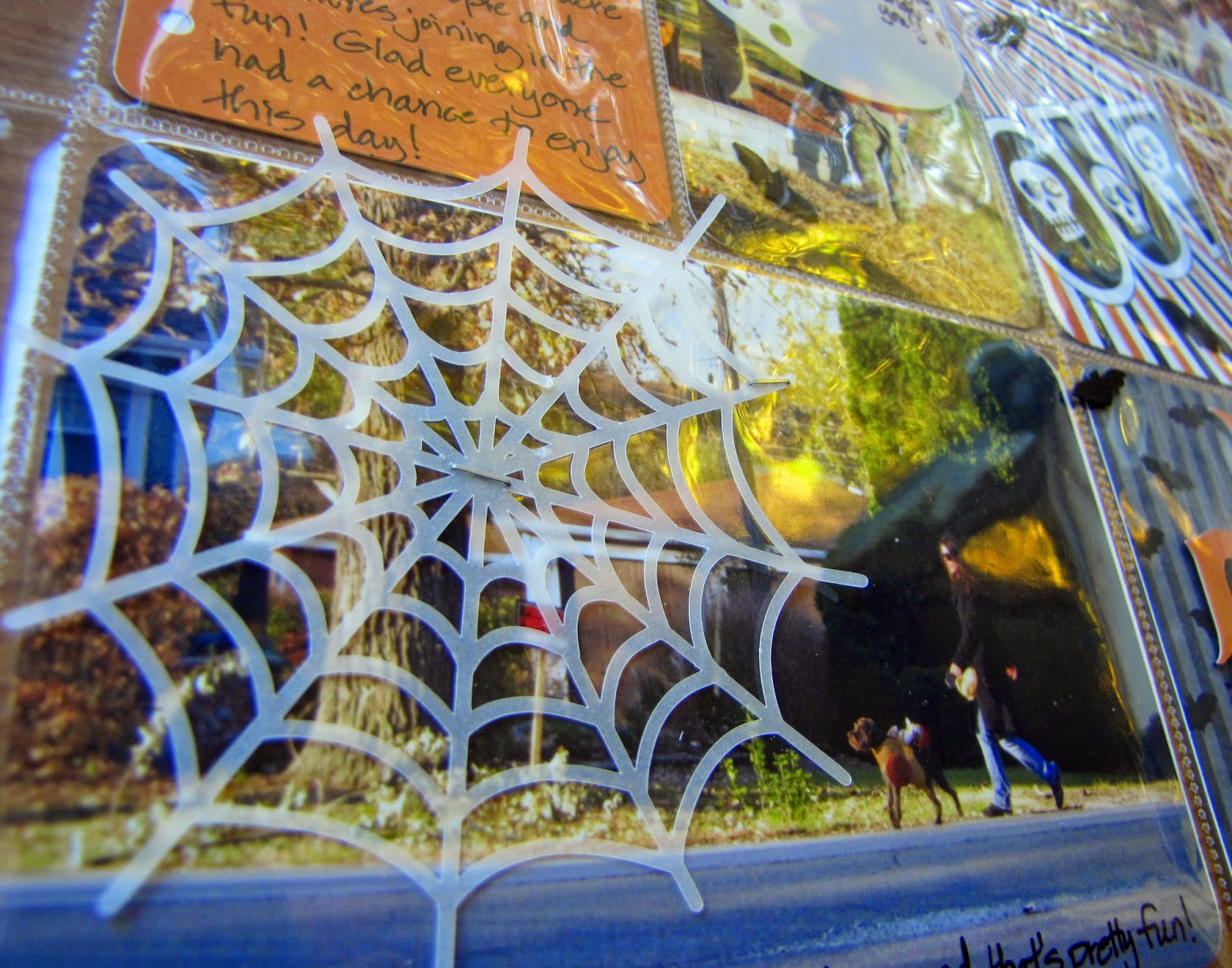
I created a pocket page using the papers for my filler cards as well as some cuts to embellish each pocket.

I love the look of vellum - I think it worked well for my spider webs and moon.


The files I used are: 

Halloween Critters Cutting Files (for the spider webs)
Wizard Owl Cutting Files (for the moon)

Notebook Pages Cutting Files (for the journaling card)

Halloween Plaid Grid (for journaling card pattern and "about" fill pattern)

Halloween Pattern Pack 2 (for filler card patterns)

Halloween Bats & Swirls (for filler card pattern)

Feel free to swing by my blog (Paper and Musings) for more details as well as the other side of this page, where I used the: 
Candy Bucket Cutting Files
 to create confetti to fill a pocket on my page about the Halloween candy!
(Sneak peek!)

I sure hope my inspiration to create something about Halloween has inspired you to create something of your own and enter the Trick or Treat Challenge! You have a little less than a week left to enter!

Thanks for visiting today! Have a great day!

Ruth 


Saturday, October 11, 2014

PPPR Trick or Treat Blog Hop

Hey, everyone! Happy Saturday, and welcome to the Pretty Paper, Pretty Ribbons Trick or Treat Blog Hop. My amazing DT and I are sharing all sorts of fun and adorable Halloween projects with you today. We have a prize up for grabs and a little freebie just for you guys. We'll also be kicking off our next challenge. So, be sure to check out each and every project along the way today...you don't want to miss a THING!

For my project today, I decided to actually get a scrapbook layout done, since I am FOREVER behind on this task. I created a layout to show off some photos from last year's Trick or Treating. Here's my layout:


For the left side of the layout, I created a traditional scrapbook page. I designed everything in my Silhouette Studio Designer Edition software and then printed out and cut the components. I used so many files that I'll list those at the end. I love the way everything is so bright and fun, which is a great way to show off these photos of my daughters in their bright and fun Halloween costumes. All of the papers are digital, by the way. I filled my shapes with them in SSDE and then print and cut them. Here's a close up of a cluster of fun cutting files that I added beneath the main photo:


For the right side of the layout, I opted for a pocket scrapbooking page that holds 4x4 photos. I only had 7 more photos to show, so I filled in the extra spots with a journaling spot and a filler card. I designed both in Silhouette Studio using digital papers and my full color PPPR SVG files. I even added some stitching lines using the program. Here are some close ups of those cards: 


I finished off the layout by tucking some candy borders in some of the pockets and scattering some random candy pieces around. I just stuck those on the outside of the pocket page using glue dots.

Here are all of the files I used to create my layout:


Of course, I have a fun little freebie just for you guys. This 3D Witch Hat will be available for FREE on Saturday, October 11 and Sunday, October 12 ONLY. Then, it will be available for purchase in the PPPR store. You can get this freebie HERE:


This hop also kicks off our new Trick or Treat Challenge. Link up your Halloween-themed project that uses PPPR files for a chance to win a $20 Gift Certificate to Pretty Paper, Pretty Ribbons. You can link up and read all of the guidelines HERE:


Okay, now how about some BLOG CANDY????


One lucky hopper will win a $15 Gift Certificate to PPPR!  Here's what you need to do for a chance to win a chance to go shopping for FREE:

1.  Be a follower of EVERY BLOG in our little hop.  There are just 12 of us, so that shouldn't be too hard.  You won't be sorry...I'm super lucky to have such talented ladies on my Design Team.

AND

2.  Leave a comment at EACH blog along the hop.  Be sure to let us know you are a follower and leave us a way to get in touch with you.

That's all you have to do.  If you would like EXTRA entries, you can also do one or more of the following:

3.  Like the Pretty Paper, Pretty Ribbons Facebook Page.  Leave me a separate comment on this blog telling me you did.  

4.  Sign up for the Pretty Paper, Pretty Ribbons Newsletter and leave a comment on this blog telling me you did.  You'll get a weekly e-mail telling you about new files, sales, events, and freebies. 

I will randomly choose a winner of the hop candy on Tuesday, October 14, 2014.

Thank you so much for stopping by today! Your next stop on the hop is Kathy.


Saturday, August 30, 2014

Give Thanks Pocket Scrapbooking Layout

Soooooo...I JUST realized that I totally did not meet my New Year's Resolutions from last year. The fact that I JUST realized this shows just how busy I've been, I guess. One of my resolutions was to create at least one scrapbook layout (traditional or pocket-style) a month. You want to know how many I've finished this year up until now? One. Yep, just one. Well, now I can happily say that I've finished two, so I'm only about 6 months behind...LOL. Oh, well. In order to get SOME photos in a book, I decided to go with a pocket scrapbooking layout. I have some Thanksgiving photos from last year in my box of printed photos, so I thought I'd get those in some page protectors for an album. This turned out to be really simple because I used the Pretty Paper, Pretty Ribbons Thankful Pocket Cards to help me out. Here's my layout:


These files come as PNG files, so I just opened them in my Silhouette Studio Designer Edition software. Once I had them opened, I resized them to measure 3x4ish and 4x6ish. The images are a little smaller than this so they would fit in the pockets as-is. So, I could have just printed out the PDF file that comes with the set and cut them out with my paper trimmer, but I wanted rounded corners without having to use my corner rounder. Anyway...once I had them resized, I drew some rounded rectangles using the Rouded Rectangle Tool in the software, and I sized them to 2.9 x 3.9 and 3.9 x 5.9. That way, there would be a "bleed" around my cards so I wouldn't get those pesky white outlines that sometimes show up when you print and cut. Here's what my screen looked like. It's a little hard to see here, but there is a slight border of color/pattern around the cut lines...you can click the photo to see a larger image. (I colored the lines blue so they'd show up better for you. Don't do that to yours, or the color will print.)


And, that's it...one more layout down, six to go. Whew! Someday, I'll find those extra hours in the day that I seem to be missing. LOL. 

Thank you so much for stopping by today! I hope you are having a wonderful weekend, and Happy Labor Day to my US friends. :D

Monday, April 21, 2014

Valentine's Day Project Life Layouts


Happy Monday!!  Nicole here today - I hope you had a blessed Easter weekend.  Today I have a couple of project life layouts I created for some Valentine's Day pictures that needed to be scrapbooked :-)


For this first page I used Pretty Paper, Pretty Ribbons Cupid Cutting Files set for the hearts and arrow. I did a print and cut with my Silhouette Cameo to create my 3x4 card.  I added some homemade enamel dots to finish it off.


For my second page I used the Pretty Paper, Pretty Ribbons Valentine Sweets Cutting Files set for my heart cupcake.  I did another print and cut but first did a shadow of my cupcake and welded it with a rectangle for the white layer of my card.  I printed an extra heart layer and popped it up with some foam tape for added dimension.  The blue polka dot paper is from Pretty Paper, Pretty Ribbons Christmas Brights Circles and Spots Digital Paper Pack.  


Thank you for stopping by today. Come back tomorrow for more Pretty Paper, Pretty Ribbons inspiration.